KQL Grammar — Koryki Query Language Reference
Koryki Query Language (KQL) is inspired by SQL and shares many of its concepts, but operates at a higher level of abstraction. Readers familiar with SQL will recognize most operators and functions.
The key differences are in how sources are declared, how joins are expressed, and which clauses are omitted because KQL derives them automatically.
KQL is simpler than SQL by design; it does not compete with SQL — it compiles to SQL before execution, delegating the full power of the underlying database engine. This also makes KQL largely database agnostic: the same query runs across different databases without modification, as the transpiler handles database-specific SQL dialect differences.
Lexical Conventions
Identifiers (ID) consist of lowercase letters, digits, and underscores, and must start with a lowercase letter or
underscore. Uppercase is not permitted — all entity names, aliases, and attribute names must be lowercase.
Comments are supported in two forms: block comments (/* ... */) and line comments (// ... to end of line).
Both are ignored by the parser and can appear anywhere whitespace is allowed.
All KQL keywords are strictly uppercase (FIND, FILTER, FETCH, etc.), while all identifiers are strictly lowercase. This
hard separation means any token can be identified by its case alone — uppercase is always a language keyword,
lowercase is always a user-defined name such as an entity, alias, or attribute.
This is more restrictive than SQL or most programming languages, which permit mixed case, but makes queries significantly easier to read and verify at a glance — for both human
authors and AI-generated queries.
KQL Query Rule
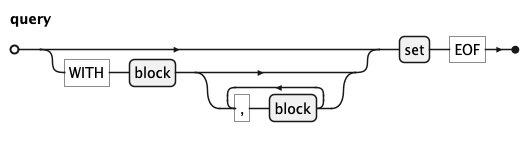
query is the root rule of KQL.
The optional WITH clause introduces named sub-queries (blocks) separated by commas.
The mandatory set at the end is the main result expression and may be a plain select or a set
operation via UNION, UNIONALL, MINUS, or INTERSECT.
An optional visualiseClause may follow the result to describe a chart for it — see
Visualisation (VISUALISE Clause) below.
KQL Block Rule
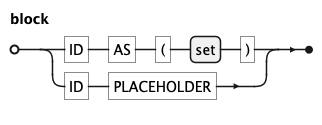
A block defines a named sub-query inside a
WITH clause. The first alternative binds an identifier to a set;
the second binds an identifier to a placeholder, allowing the sub-query to be injected
externally at runtime.
KQL Set Rule
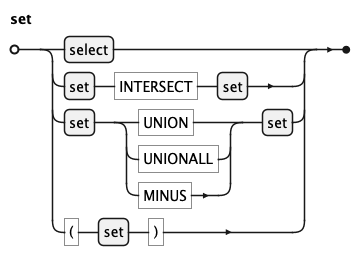
A set is either a plain select or a set operation via
INTERSECT, UNION, UNIONALL, or MINUS. INTERSECT binds
more tightly than the other operators; parentheses can be used to override precedence.
KQL Select Rule
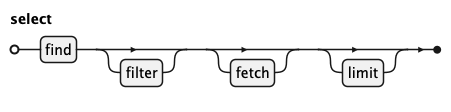
select is the core query construct, built from up to four clauses.
The mandatory FIND clause names the primary source and any linked sources to traverse.
It is followed by an optional FILTER clause for predicates, an optional FETCH clause defining the
output expressions, and an optional LIMIT
clause capping the number of returned rows.
KQL deliberately omits GROUP BY, HAVING, and ORDER BY.
Grouping is inferred automatically whenever FETCH contains an
aggregate expression. Aggregate predicates in FILTER are promoted to
HAVING by the transpiler. Sort order is declared inline on
each fetch_item using ASC or DESC. This keeps queries
concise and frees the user from SQL's clause-placement rules.
This omission is a key design feature. In SQL, misplacing an
aggregate expression between WHERE and HAVING, or forgetting a column
in GROUP BY, are frequent error sources — for both human authors
and AI-generated queries. By deriving these clauses mechanically from
the structure of FIND, FILTER, and FETCH, KQL eliminates
an entire class of mistakes. A non-SQL-expert can read and verify a
KQL select top to bottom without knowing SQL's clause-placement rules,
and an AI model generating KQL
needs to reason about far fewer structural constraints than it would
to generate equivalent SQL.
KQL Find Rule
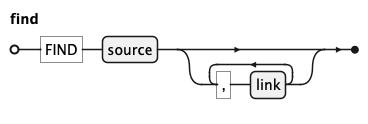
FIND introduces the graph of sources the query operates on.
It requires exactly one primary source, optionally extended by a
comma-separated list of linked sources.
KQL Filter Rule
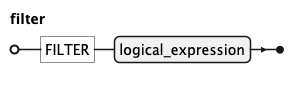
The FILTER clause narrows the result set by applying a logical predicate to
the source rows matched by source-graph in findrule and existsrule.
It accepts any logical_expression.
KQL Fetch Rule

fetch is a list of fetch_item entries that determines what data appears in the result —
the columns and computed values the select returns.
The optional DISTINCT keyword removes duplicate rows from the result, and ROLLUP adds automatically
computed subtotal rows for grouped results.
When the list mixes plain fields with aggregate functions such as count or sum,
KQL automatically groups the result by the plain fields — no explicit
GROUP BY is needed. The fetch list therefore serves a dual purpose: it declares what to return
and implicitly defines how rows are grouped.
KQL Fetch Item Rule
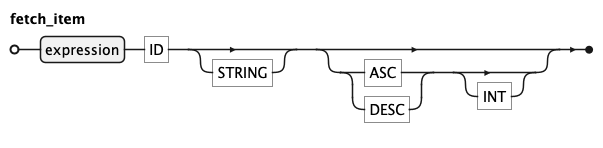
A fetch_item is a single output expression — a field, a computed value, or an aggregate function.
An optional header identifier gives the expression a name in the result.
A label is a double-quoted display string for UI rendering and may only appear when a header is present —
a label without a header is not permitted.
Each fetch_item can carry a sort direction (ASC or DESC), replacing the need for
a separate ORDER BY clause. When multiple items specify a sort direction, sort priority
is determined by the position of each fetch_item in the fetch.
An optional integer index overrides this default
and explicitly controls sort priority.
KQL Limit Rule
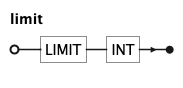
LIMIT caps the number of rows returned by a select to the given integer value.
KQL Link Rule
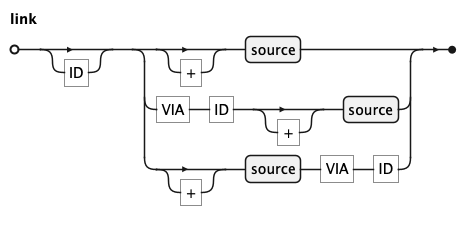
A link declares an additional source to join to the source graph.
The optional first identifier specifies which
already-declared source to join from; when absent, the link is
implicitly attached to the preceding source in the list.
Literal + produces an optional link (LEFT OUTER JOIN), preserving rows
even when no matching counterpart is found in target source. A link without + produces a
mandatory link (INNER JOIN); rows are only returned when matching data exists in both sources.
When two sources share more than one relationship, a criteria identifier
is mandatory.
Keyword VIA introduces the criteria identifier and may appear before or after the target source.
Both alternatives (second and third) are semantically identical; the author may lead with whichever is known first —
the criteria or the target source.
KQL Logical Expression Rule
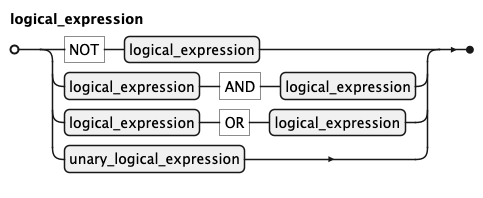
A logical_expression is a boolean predicate composed of
unary_logical_expression base cases combined with NOT, AND, and OR.
Standard boolean precedence applies — NOT binds most tightly,
followed by AND, then OR — and parentheses override it.
KQL Unary Logical Expression Rule
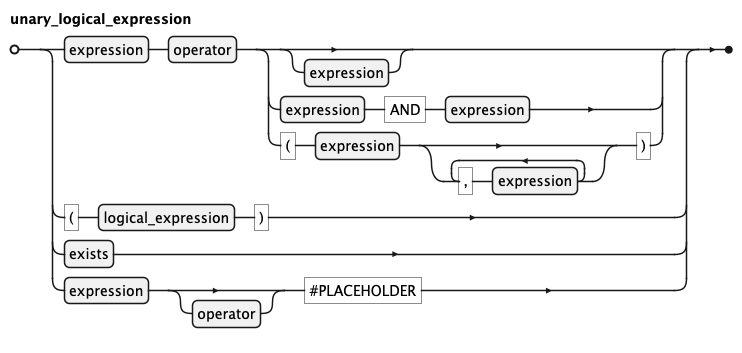
A unary_logical_expression is the atomic building block of boolean predicates
in KQL. The most common form is:
expression operator right-hand-sideWhere the right-hand side can be:
- absent (
ISNULL) - a single expression
- a
BETWEENpair - a parenthesized
INlist
Three further alternatives exist:
- a
logical_expressionwrapped in parentheses for explicit grouping exists, which tests whether a linked sub-graph contains at least one matching row.- a
placeholderform, marking positions where the caller supplies values at runtime.
KQL Exists Rule
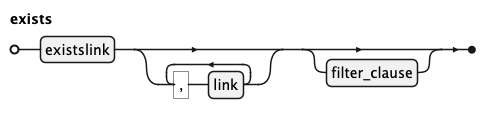
EXISTS introduces the correlated sub-graph of sources the exits-check operates on.
Unlike select, it produces
no output — only a boolean indicating whether at least one matching row exists in the sub-graph.
KQL Existslink Rule
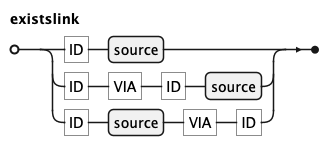
An existslink is the mandatory first link inside an exists clause.
Unlike a regular link, the from identifier is always required and + is not
permitted — existence checks are inherently about whether matching rows are found,
making optional joins meaningless in this context.
KQL Source Rule
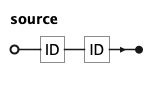
source declares which entity to query and how to refer to it within the select. The first identifier is the entity name as
defined in the semantic layer; the second is the alias used in all subsequent references (link, FILTER, and FETCH clauses).
KQL Expression Rule
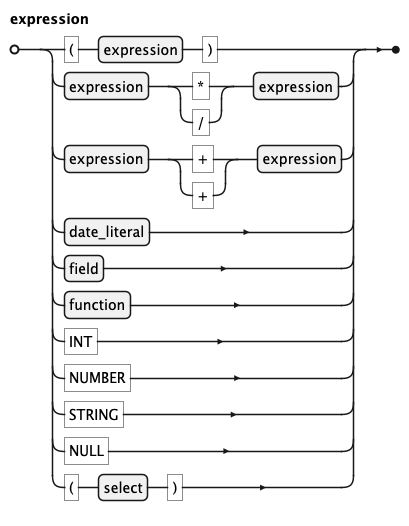
An expression is a value-producing term used throughout the query.
It covers unary negation (-expr, +expr), arithmetic (*, /, +, -), field references,
function calls, literals (INT, NUMBER, SQ_STRING, NULL), temporal_literal,
and sub-selects. Parentheses can be used to group and override arithmetic precedence.
Unary - negates a value; unary + is a no-op included for symmetry. Both bind more tightly than
binary operators, so -a * b means (-a) * b. Use parentheses to negate a compound expression:
-(a * b).
Literal values are written as integers (42), decimal numbers (3.14), single-quoted strings ('text'), NULL, or temporal literals.
Negative literals are written with a leading unary minus: -3.14.
KQL Function Rule
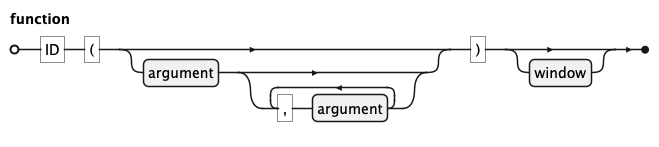
A function is a named operation applied to zero or more arguments. Aggregate functions such as count or sum
summarise values across rows; scalar functions transform a single value. An optional window clause turns any
aggregate into a window function, computing the result over a defined partition of rows without
collapsing them into a single output row.
KQL Argument Rule
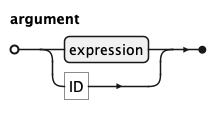
An argument is a value passed to a function. It is either an expression or a bare identifier, allowing functions
to accept both computed values and entity references such as count(o).
KQL Field Rule
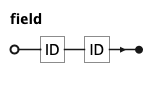
A field references a single attribute of a source as alias.name, where alias identifies a source declared in
FIND and name is the attribute name as defined in the semantic layer.
KQL Window Rule

A window clause attaches to a function and defines the set of rows the function operates over, without collapsing
them into a single result row. The optional PARTITION clause divides rows into independent groups; the optional
ORDER clause defines the row sequence within each partition; and the optional frame clause narrows the window
further to a subset of rows relative to the current row.
KQL Window Order Rule
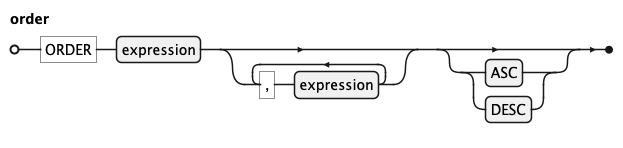
The ORDER clause inside a window defines the sequence in which rows are processed within each partition. It accepts
one or more expressions and an optional ASC or DESC direction.
KQL Frame Rule

A frame narrows the window to a sliding subset of rows relative to the current row, defined by a lower and upper
window_limit bound. Only ROWS frames are supported, which count bounds by physical row offset rather than value range.
KQL Frame Bound Rule
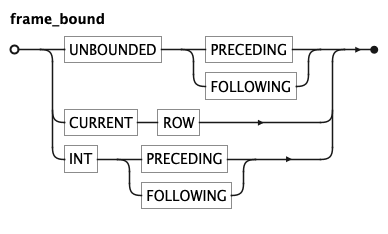
A frame_bound defines one boundary of a frame. UNBOUNDED PRECEDING or UNBOUNDED FOLLOWING extends the boundary to the
first or last row of the partition; CURRENT ROW sets it to the current row; and an integer offset sets it to a
fixed number of rows before or after the current row.
KQL Temporal literal Rule
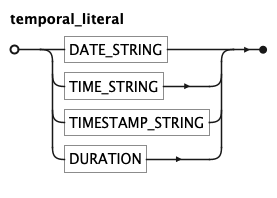
A temporal_literal is a double-quoted temporal value or a compact DURATION token.
Double quotes delimit temporal values; single quotes delimit text strings — a consistent,
learnable distinction that also eliminates ambiguity with arithmetic operators.
| Token | Format | Example |
|---|---|---|
DATE_STRING |
"YYYY-MM-DD" |
"2023-01-31" |
TIME_STRING |
"HH:MI:SS[.mmm][±HH:MI|Z]" |
"14:30:00" |
TIMESTAMP_STRING |
"YYYY-MM-DD HH:MI:SS[.mmm][±HH:MI|Z]" |
"2023-01-31 14:30:00" |
DURATION |
<n>(ms|s|min|h|d|w|mo|q|y) |
30d, 2h, 15min |
TIMESTAMP_STRING uses a natural space separator between date and time; the surrounding
quotes make the space unambiguous to the lexer.
DURATION is a compact notation for a time span used in date arithmetic. The sign is not part of the
token — write now() - 30d (subtraction) to go back 30 days, not -30d.
Visualisation (VISUALISE Clause)
KQL can describe a chart for a query result with an optional VISUALISE clause — a declarative
Grammar of Graphics that compiles to a Vega-Lite
specification. It is appended after the query result and never changes the returned rows; not every
query has a meaningful chart. As everywhere in KQL, keywords are uppercase, while channel, geom,
coordinate, palette, and transform names are lowercase identifiers, validated semantically by the
compiler rather than reserved in the grammar.
visualiseClause
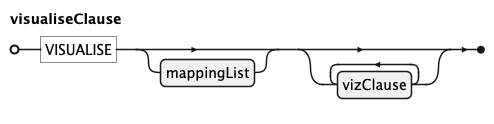
visualiseClause follows the set at the end of a query. An optional leading mappingList binds
columns to visual channels for the whole chart, followed by any number of vizClause layers and
settings.
vizClause
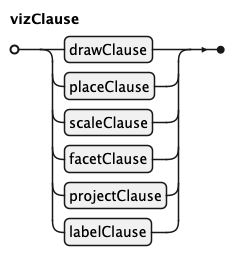
Each vizClause is one building block of the chart: a drawClause or placeClause (marks), a
scaleClause, a facetClause, a projectClause, or a labelClause. They may appear in any order
and any number.
drawClause

DRAW adds a mark (geom) — point, line, bar, area, text, or a statistical geom
(histogram, boxplot, smooth, density, violin, heatmap). Multiple DRAW clauses stack as
layers. A per-layer mappingClause adds channels for this mark; a remappingClause overrides a
channel (typically onto a statistical output such as density); a settingClause passes options
such as aggregate or position.
placeClause
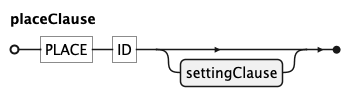
PLACE draws an annotation mark whose aesthetics are literal SETTING values rather than data
columns — for example a reference rule at a fixed position.
scaleClause

SCALE configures how one channel maps data to pixels or colours: an optional scaleType, the
channel name, an optional input domain (scaleFrom), an output range or named palette (scaleTo),
a transform (scaleVia, e.g. log), further settingClause options (breaks, reverse), and
axis/legend relabelling (renamingClause).
facetClause

FACET splits the chart into small multiples — one panel per value of the given facetVars. A
second group after BY produces a row/column grid; a settingClause controls the column count
(ncol) and independent scale resolution (free).
projectClause

PROJECT [projectAes] TO coord selects the coordinate system: cartesian (listing aesthetics
swaps the axes), polar (pie/donut), or a named map projection (mercator, orthographic,
albers, …). A settingClause carries projection options such as origin, parallel, sphere,
and graticule.
labelClause
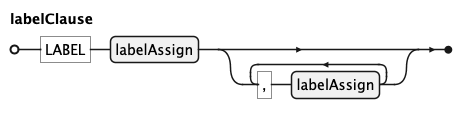
LABEL target => 'text' sets titles: title for the whole chart, or a channel name (x, y,
color, …) for that axis or legend. Each entry is a labelAssign.
Mappings
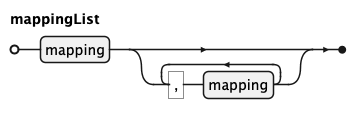
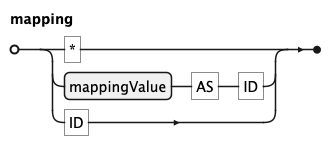
A mappingList is a comma-separated list of mappings, used both globally (after VISUALISE) and
per layer (inside mappingClause / remappingClause). Each mapping binds a mappingValue to a
channel with value AS channel, names a channel that shares its column name, or is * to auto-map
every output column whose name is a known channel.
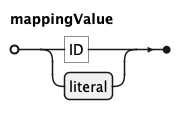
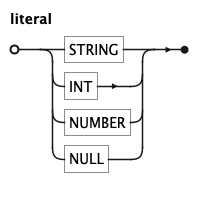
A mappingValue is a column identifier or a literal — a string, integer, number, or null — which
produces a constant channel value.
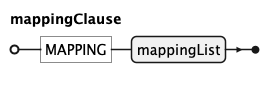
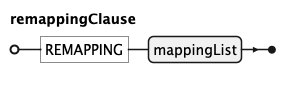
mappingClause (MAPPING) and remappingClause (REMAPPING) each wrap a mappingList for a
single DRAW layer.
Settings

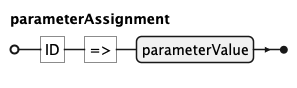
A settingClause (SETTING name => value, …) passes options to a clause. Each parameterAssignment
maps an option name to a parameterValue.
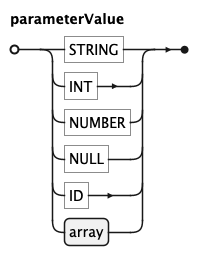
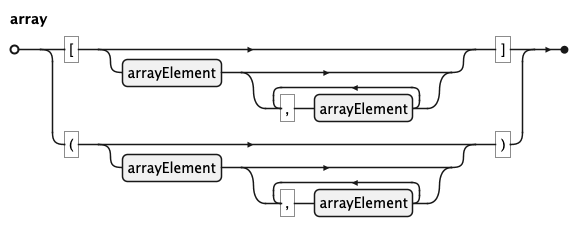
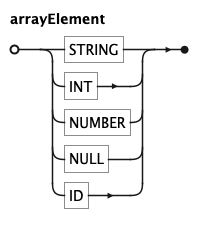
A parameterValue is a string, integer, number, null, identifier, or an array — a bracket- or
parenthesis-delimited list of arrayElements (used for domains, ranges, and coordinate pairs such
as origin => (10, 50)).
Scale building blocks
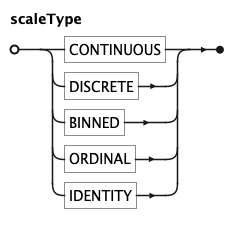
scaleType is one of CONTINUOUS, DISCRETE, BINNED, ORDINAL, or IDENTITY.
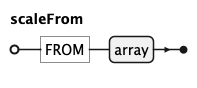
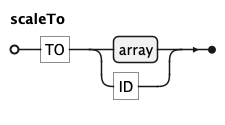
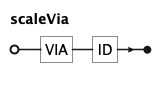
scaleFrom (FROM array) gives the input domain, scaleTo (TO array or a palette name) the
output range, and scaleVia (VIA transform) the scale transform (e.g. log, sqrt).
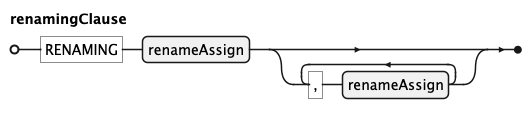
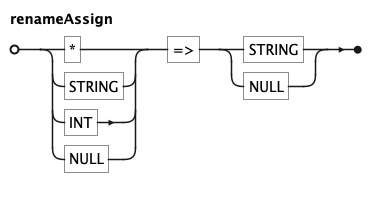
renamingClause (RENAMING) relabels individual tick or legend entries; each renameAssign maps a
source value (or *) to a replacement label.
Facet and project variables
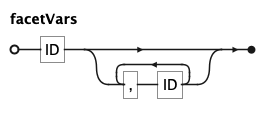
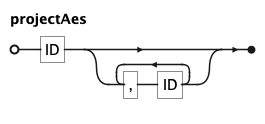
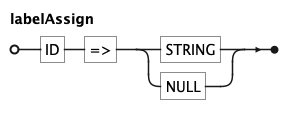
facetVars and projectAes are comma-separated identifier lists — the facet columns and the
projected-aesthetic order, respectively. labelAssign maps a target (chart or channel) to a string
or null.
Concept SQL & KQL
| Concept | SQL | KQL |
|---|---|---|
| Query sources | FROM table t |
FIND entity alias |
| Filtering rows | WHERE |
FILTER |
| Output columns | SELECT |
FETCH |
| Joining | JOIN ... ON ... |
link with + / VIA |
| Grouping | GROUP BY (explicit) |
inferred from FETCH |
| Aggregate filter | HAVING (explicit) |
inferred from FILTER |
| Sorting | ORDER BY (separate clause) |
ASC/DESC inline on fetch_item |
| Sub-queries | WITH ... AS (...) |
WITH block |
| Existence check | EXISTS (SELECT 1 FROM ...) |
EXISTS(existslink ...) |
| Row limit | FETCH FIRST n ROWS ONLY |
LIMIT n |
| Identifiers | case-insensitive | strictly lowercase |
| Keywords | case-insensitive | strictly uppercase |
The most significant omission is JOIN: KQL replaces explicit join conditions with named relationships from the semantic layer, so authors declare which entities to connect rather than how to connect them at the column level.